

What you should know if you are reading this
Our goal is to have a look at the mobile app development technology for startups in 2021, in order to publish an app for Android and an app for iOS with the perfect trade-off between quality and time+resources. How do we choose the best technology to accomplish this task?
First of all, the most accurate answer is:
it depends.
Every startup has different needs, in terms of business, technology, resources (how many developers? and how many of them are senior?) and deadlines.
Assumptions
There are 200000 articles out there about this subject.
This is why I want to list some boundaries that will “limit” our research. So this is not a general article Native vs Cross platform but is a study for a specific case.
That said, let’s start with these assumptions:
- The start-up technological stack has a very strong connection with Google, mostly with Firebase. This is a very important aspect. In the start-up X the most important technology could be Y, so adjust the content of the article accordingly;
- The start-up was providing all the services in web pages only, and the current app is basically a Webview showing an ad-hoc version of the website. I know, I know! Anyway, there is an ongoing process to transform all the services into a full set of (modularised) REST APIs that we can then consume in our app;
- The app does not have heavy processes in terms of device resources, does not do any image/video processing and so on. Anyway, it has to have reliable access to the camera and retrieve the accurate users position through GPS;
- The current technology is React Native, so we already saw both the pros and cons of a not-native approach. But not-native includes a world of solutions, that we will try to consider in this article;
- The strong connection between React and Firebase, to build business web applications in JavaScript with all the power of the Firebase services, is very well explained in a book that I strongly suggest;
- last but not least, I am not vertical on mobile technologies, so your feedbacks are very welcome.
Technologies in this study
I like a lot the category names reported in a very interesting article by Ionic: #h-hybrid-native-vs-hybrid-web" target="_blank">Comparing Cross-Platform Frameworks.
I will use the same labels that are
Hybrid-Native
Shared codebase, plus native code. Basically:
it allows you to program your user interfaces (UI) in one language that then orchestrates native UI controls at runtime.
Ionic article #h-hybrid-native-vs-hybrid-web" target="_blank">Comparing Cross-Platform Frameworks
Hybrid-Web
One codebase, running everywhere. Your code does not get “translated” in native components, but
the UI components you use in your app are actually running across all platforms
Ionic article #h-hybrid-native-vs-hybrid-web" target="_blank">Comparing Cross-Platform Frameworks
So basically you can code with “web” technologies (HTML/CSS/JS) and your UI components will be shown on the device.
Technologies and platforms in the article
According to the previous definitions, we will analyze the following platforms/technologies:
- 100% native code: one app for iOS, one app for Android, with their respective languages, IDEs and so on;
- ReactNative (Hybrid-native);
- Flutter (Hybrid-native);
- NativeScript (Hybrid-native);
- Xamarin (Hybrid-native);
- Ionic (Hybrid-web) ( – that includes PhoneGap / Cordova).
 Image from aalpha
What’s the study about and how do we try to understand if a choice is better than another one
We will briefly describe pros and cons of every technology.
Then we will compare them at high level and a bit in terms of performances.
At this point we will take into account other important factors:
- Who’s behind them?
- The community around each technology;
- Available libs: active development, time to “port” new features, stability, support and community;
- Trends: we don’t want to adopt a technology that is going to become marginal in the next few years;
- Very few observations related to the UI/UX aspect.
One by one
100% Native
Basically, we have 2 separated projects here: one for Android, one for iOS.
Thanks to the respective IDE (Android Studio and XCode) you will probably be able to build a good skeleton of your app and a good enough flow between the views with no or few code required, with a “drag & drop” approach for elements (buttons, text fields, …). A very good preview is also available, without using a simulator, for example.
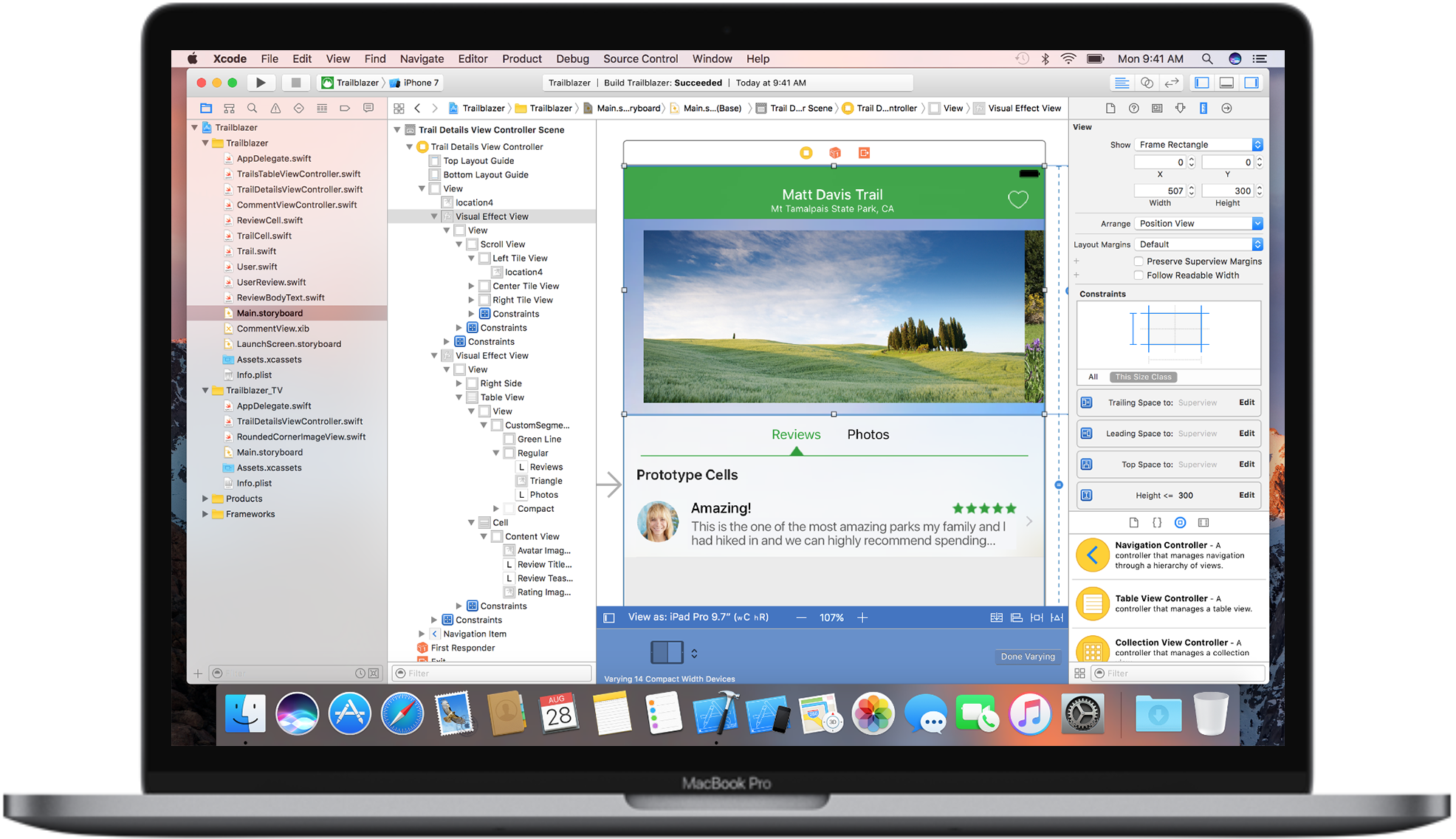 XCode interface builder from apple.com
That’s great. Anyway, all the logic such as performing API calls, dynamically adding/removing content, handling Push notifications, accessing GPS position, accessing camera/gallery and so on, are performed with a platform-specific language: Swift (Objective-C) for iOS, Kotlin (Java) for Android.
All of this just to say that the two apps will live on two separated, parallel projects. You can of course merge some high-level logic regarding how to manage certain flows, but at the end you have to code them separately.
Two separated projects, two separated teams with separated skills. In the worst-case scenario this could double the needed resources.
On the other side you have the maximum reliability when you are going to handle device resources such as the camera or the GPS.
You have all the debugging and profiling power you need in your IDE.
Even regarding 3rd-party libraries (of course here a lot depends on the library itself) you can have less surprises if you are using the specific library for the given platform.
– Firebase
In case of Firebase, an Android native solution is incredibly good, of course, due to the fact that we’re talking about Google solutions.
Also Firebase has an official SDK for iOS, so the native solution is incredibly good for iOS, too.
Hybrid-web
We have just one project here: you will code an HTML/JS/CSS solution, that’s it. All the UI is shared between the platforms, so you have a very consistent UI and you don’t need to have different components for different platforms. You can, or you can simply have a different CSS applied for each platform.
For debugging purposes you have different layers to take care of, but most of the job related to the UI can be done in a web-based debugging tool like the Chrome Developer tools. One place, different platforms.
So, we were saying that we have just one project here, and this is something to carefully think about if you are a start-up. Additionally, you can “re-use” web related skills in your team to build your app, substantially decreasing the resources needed to complete it.
How about the device resources?
For the most common tasks such as taking a picture or accessing the GPS location, you can be sure to find a plugin (official or not) that takes care of these tasks for you.
The main idea is that there is a sort of Javascript API system to communicate with the underlying platform.
Ionic
With Ionic you can be sure to have someone in your team that can build a simple app with a small learning curve, due to the fact that it supports the major Javascript frameworks and libraries such as React, Angular and Vue.
It has 120 native device plugins for Camera, GPS, Bluetooth and so on.
It relies on Capacitor or Cordova to execute your web components within wrappers targeted to each platform, with API bindings to access device’s capabilities.
This is the architecture compared to the native one:
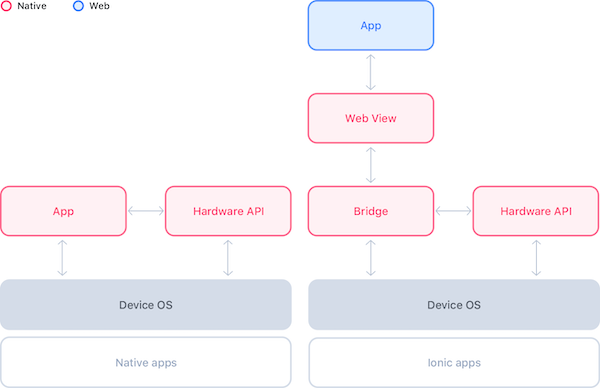 Native vs Ionic apps. From the official Ionic doc.
– Firebase
The Ionic official documentation points to a specific plugin page on GitHub.
This plugin page has a build: failing tag on it (3rd of January 2021): no good.
Let’s see the popularity of the plugin:
| Watch | 68 |
| Stars | 993 |
Anyway, if your choice is Ionic and you want to continue your journey with React, I strongly suggest this book to give you very useful hints on how to build robust web applications with React and Firebase.
For this part, that’s it! In the next part we will focus on the Hybrid-Native solutions.
The post Choosing the technology behind a mobile app for a startup in 2021: Native vs cross-platform (part 1) appeared first on L.S..
Ancora nessun commento. Sii il primo!
Accedi per votare e commentare!